
New FS maps in digital format coming soon!
D
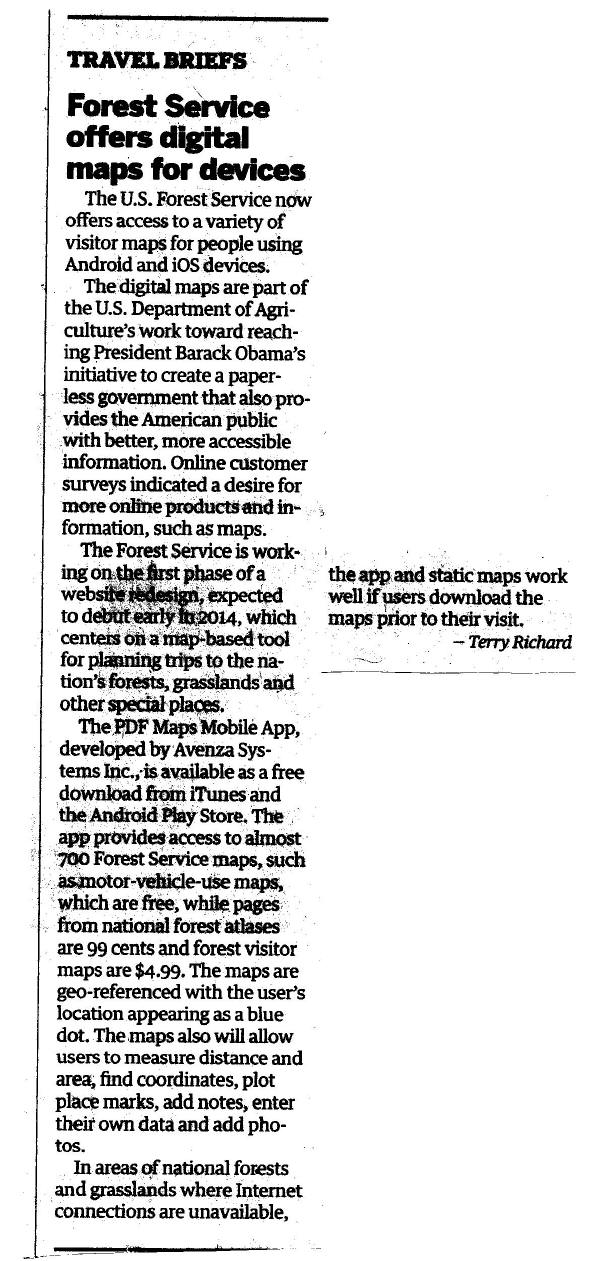 I read in last Sundays Oregonian (see scan) that the FS will be making available digital maps and apps to use on cell phones early 2014. I always thought that it would be great to get a digital district map on a disc so I can just print out the section I need from my computer, enlarge sections to reveal more detail, and add details of my own choosing.
Don
I read in last Sundays Oregonian (see scan) that the FS will be making available digital maps and apps to use on cell phones early 2014. I always thought that it would be great to get a digital district map on a disc so I can just print out the section I need from my computer, enlarge sections to reveal more detail, and add details of my own choosing.
Don
R
Here is the link to the FS announcement:
http://www.fs.fed.us/news/2013/releases/11/e-maps.shtml
Unfortunately, it only works on iPhones, iPads and android devices. No PCs. It does sound kind of cool, though. You would think that because the maps are PDF files it could work on a PC!
D
Yea, it's the usual story, whatever your using is obsolete, sorry, upgrade. I remember watching black and white TV, listening to the radio until I fell asleep, changing 45's and 33's on the turntable, putting in a new 8 track cassette into the dash of whatever you were driving or a cassette tape, then CD's arrived and then of course there were MP3's to deal with and now your talking to your car or your TV to tell it what to do. I know PC's are so outdated! That phone your using right now was probably outdated before you bought it, that's why it was such a good deal. Hello! When I graduated from high school I was using a slide rule, but when I went to college that same year they required that I have a scientific calculator to use in several courses. I also remember a junior year statistics class that used the college's computer via a terminal in an adjacent room that you sent DOS messages, this was pre-PC. I've come full circle, I'm obsolete!
R
FYI, I downloaded and installed the app last night, and after some frustrating searching, finally found the district map, however it shows up as "n/a", meaning (I'm guessing) not available. None of the Mt Hood Forest district maps were available. Interestingly enough, it says you can buy them on the national forest store website, but the only one listed there is the whole Mt Hood NF map.
I guess I will wait a while and see if it becomes available. The last update of that map was 2002. Wonder if it will ever get updated?
B
Unfortunately, it only works on iPhones, iPads and android devices. No PCs. It does sound kind of cool, though. You would think that because the maps are PDF files it could work on a PC!
There are no barriers to running something similar to this on a PC or Mac or Ubuntu and so on. The question is why do you need yet another app just to look at PDFs just like the ones you are already viewing on those devices?
I've been using NeoTreksGPS which, besides the maps and the blue location dot, records your tracks. Much better deal IMHO.
Bryon
R
I thought there were other features it had besides your current location (blue dot)? If it is just a wrapper for the current maps, I'll pass.
It actually says that you should be able to purchase district maps through the software, but when I tried it shows them but gives no option to purchase any of the district maps for Mt Hood NF. Oh well...
B
I looked into this further, and found that is actually does tracks. And a lot more. This app is really designed and intended for professional mappers but it has a lot of features anyone can use. Their writeup online on most pages almost ignores the track recording, but I finally found this with a clear statement that it does: http://www.avenza.com/pdf-maps# . Other functions likely will only be used by professionals who have access to software that can produce geospatial PDFs, GeoTIFFs or GeoPDFs. Given that, you can produce maps with specialized GPS, GIS and other data which can then be viewed in this app. And that is the real claim to fame for this product. A normal PDF map file will not magically become usable by this app, they do not have the required GIS type data in them. This fact is likely the source for the complaints about this app that are in the app store. The ability to record tracks was added with app version 2.0; its now at 2.1. All the glowing testimonials on their sites are from mapping professionals.
For the rest of us this will measure lines and areas, record waypoints/points of interest, export KLM files for Google Earth, CSV, or GPX files which mean the data can transfer to databases and Excel-compatible spreadsheets, display your current map view in Google Earth (assuming you are on a network) and it appears to have a note taking and photo taking system that will display all that on a map. The maps can be displayed in lower and higher resolution.
Yes, this app also acts as a sales tool for maps. The have an online store with 700,000 maps available, some of which are free and the others start at .99.
I will be testing this and hope to get some custom maps on it to see how it works. More to follow once I get a chance to see how this matches up to the hype.
Log in to reply.